

Lovable AI App Builder Review (2026): Can You Build a Website Without Coding?
Building a website or web application used to require a combination of coding skills, design knowledge, hosting, databases, and a considerable amount of time. Today, AI app builders are changing that process. Instead of writing every line of code yourself, you can describe what you want to create and let AI help build it.
One tool attracting attention in this space is Lovable, an AI-powered platform that turns written instructions into websites and web applications.
But is Lovable genuinely useful for building real projects, or is it mainly suitable for creating impressive-looking demos?
I explored Lovable while building My AI Forge, my website focused on AI tools and software. That experience helped me understand both its advantages and the practical challenges that beginners should consider before using it.
In this review, we will examine how Lovable works, what you can build with it, its major features, limitations, pricing considerations, and who should use it.
What Is Lovable AI?
Lovable is an AI-powered app builder that helps users create web applications by describing their requirements in natural language. Instead of starting with an empty code editor, you can explain your idea, and Lovable generates the interface and application code.
For example, you could ask it to create a landing page, a customer dashboard, a calculator, or a website with user registration. You can then request changes through additional instructions.
Lovable is particularly interesting for people who have useful ideas but lack the technical experience to build them from scratch.
The platform can also connect applications to backend services for features such as authentication, databases, and file storage. Its integrations and development workflow make it possible to build more than a static website.
You can explore the platform on the official Lovable website.
How Does Lovable Work?
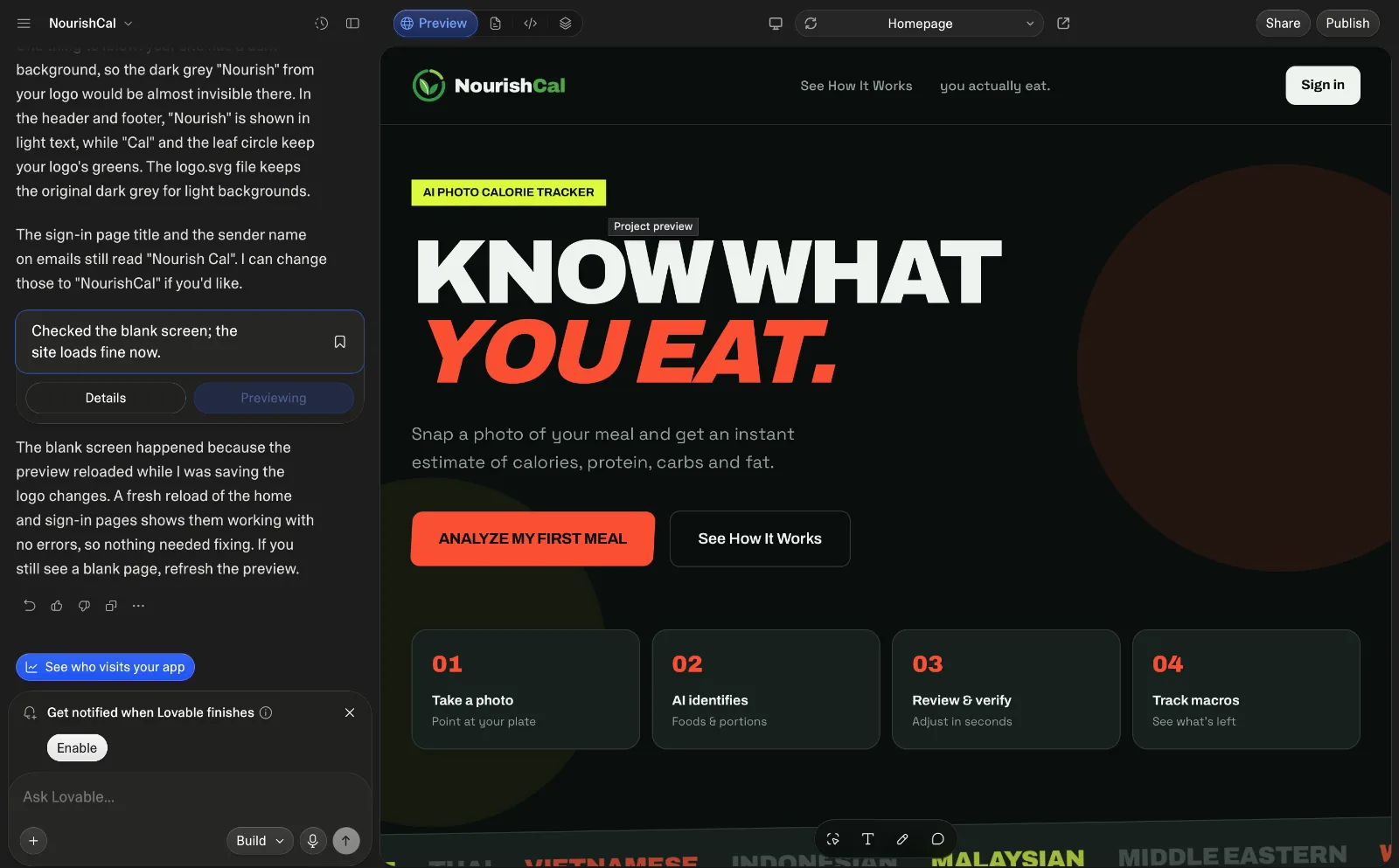
The basic workflow is straightforward. You describe your idea, review what the AI creates, and refine the result until it matches your requirements.
1. Describe your idea
Start by explaining the website or application you want to build. Include its purpose, intended users, design preferences, and essential features.
For example, you might request a YouTube revenue calculator where visitors enter their monthly views, select a content category, and receive an estimated earnings range.
A specific prompt usually produces a more useful starting point than a vague instruction such as “build me a website.”
2. Let Lovable generate the application
Lovable uses your instructions to generate application code and a user interface. Depending on the project, it can also help set up backend functionality and integrations.
You can inspect the result, try its controls, and identify missing features.
Remember that an attractive interface does not automatically mean every button, form, or calculation works correctly.
3. Improve the result through conversation
One of Lovable's biggest advantages is the ability to request changes without manually editing every component.
You can ask it to adjust spacing, change colors, add a search function, improve mobile layouts, or connect a form to a database.
For example, when working on an existing website, you can explicitly tell Lovable to modify one page without changing the homepage or unrelated features.
That instruction is important because AI-generated changes can sometimes affect shared components or existing functionality.
4. Test and publish
Once the application is ready, test its features and publish it using the available deployment options.
You should also check mobile responsiveness, forms, navigation, security settings, and any third-party integrations before sharing the website publicly.
Publishing is the beginning of operating a website, not the end of development.
My Experience Using Lovable
I used Lovable to build My AI Forge, my website focused on AI tools, software, and useful online resources.
One of the biggest benefits was being able to explain what I wanted in ordinary language instead of writing the entire website manually.
For example, I could work on navigation, article layouts, and dedicated tool pages by describing the required changes. I could also request functionality for specific pages while instructing the platform to preserve unrelated parts of the site.
This approach made experimentation easier. I could start with a basic feature, test it, and then request improvements.
However, the experience also taught me that building a website with AI still requires active involvement.
Sometimes a requested change needs several rounds of instructions. A feature that looks complete may need additional testing. Integrations involving advertising scripts, authentication, storage, or third-party services require particular care.
You also need to understand what you are asking the AI to change. For instance, adding a script globally when it should run on only one page can create unintended consequences.
My conclusion is that Lovable reduces the amount of manual coding required, but it does not eliminate the need for planning, testing, and maintenance.
Key Features of Lovable
Natural-language app development
You can describe your requirements in everyday language and let Lovable translate them into application code.
This lowers the initial barrier for beginners who have never built a website before.
Interface generation and editing
Lovable can generate page layouts, navigation, forms, dashboards, and other interface elements. You can then refine the design through additional prompts.
This is useful when you want to experiment with different layouts without rebuilding the entire interface yourself.
Backend integrations
Applications often need more than a visual interface. They may need to save information, manage accounts, or store uploaded files.
Lovable supports backend workflows through integrations such as Supabase and its own cloud capabilities. Depending on the setup, these can provide database functionality, authentication, and storage.
You can learn more about the available options through the official Lovable documentation.
External API connections
An API allows one application to communicate with another service.
For example, an application might use an external API to retrieve information, generate AI responses, or process other data.
Lovable can help implement these connections, but you still need valid credentials, suitable permissions, and an understanding of any usage limits or costs.
Never expose private API keys in publicly accessible frontend code.
Website publishing and custom domains
Lovable provides publishing options, and eligible plans support custom domains. This allows you to move beyond an experimental project and establish a website under your own domain.
For a business or content website, a custom domain can make the project easier to brand and manage.
Code access and GitHub integration
Lovable supports working with code and connecting projects to GitHub. This can help with version control, collaboration, and transferring work to a developer.
Having access to the code is valuable because your project may eventually require changes beyond what you can comfortably manage through prompts.
What Can You Build With Lovable?
Lovable can be useful for a wide range of web-based projects.
Business websites: Create landing pages, service websites, portfolios, and lead-generation forms.
Online calculators: Build tools for estimating YouTube earnings, comparing costs, or calculating other values based on user inputs.
Internal dashboards: Create interfaces for tracking information, managing records, or monitoring business activity.
AI-powered applications: Build interfaces that connect to AI services for tasks such as summarization, content assistance, or data analysis.
Membership websites: Develop account registration, login flows, and features that depend on authenticated users, provided the backend and access controls are configured correctly.
Early-stage SaaS products: Create a minimum viable product, or MVP, to test whether people find your idea useful before investing in a larger development project.
The best starting point is usually a focused application that solves one specific problem. Building and testing a small tool is easier than launching a complex platform with dozens of interconnected features.
Lovable Advantages and Disadvantages
Advantages
Lower technical barrier: You can begin with an idea and written instructions instead of learning an entire programming stack first.
Faster experimentation: Generating and refining interfaces can be much quicker than building every component manually.
Flexible projects: You can work on websites, interactive tools, and applications with backend functionality.
Iterative development: You can improve an existing project through follow-up instructions rather than starting again each time.
Useful for small teams: Entrepreneurs, creators, and small businesses can explore ideas without immediately hiring a full development team.
Disadvantages
AI can misunderstand instructions: Complex requirements may need clarification and several revisions.
Testing is still necessary: Generated code can contain errors, incomplete functionality, or unexpected behavior.
Security requires attention: Authentication, database permissions, uploaded files, API keys, and payments must be configured correctly.
Usage limits and costs: Available credits and paid features depend on your plan. Additional development or application usage may introduce costs.
Complex projects need technical oversight: Large applications, sensitive data, complicated integrations, and demanding performance requirements may require experienced developers.
Ongoing maintenance remains your responsibility: A published application needs monitoring, updates, troubleshooting, and occasional redesigns.
Is Lovable Free?
Lovable offers a free plan, along with paid plans that provide additional capabilities. The available credits, publishing options, and other features can vary by plan and may change over time.
Before choosing a subscription, visit the official Lovable pricing page to check the current limits and included features.
My recommendation is to begin with a small project on the free plan if its current allowances meet your needs. Use that project to understand how the platform works and how quickly you consume credits.
Do not upgrade simply because you have an idea. Upgrade when you understand which paid features you need and how they support your project.
Also consider costs outside the subscription. A website may require a domain, external API usage, database services, email delivery, payment processing, or other paid services.
The total cost depends on what you build and how people use it.
Lovable vs Traditional Website Development
Lovable and traditional development solve similar problems through different workflows.
With traditional development, a developer generally has direct control over the code and can design the architecture around the project's requirements. This approach can be better for highly customized applications or systems with demanding technical requirements.
Lovable makes it easier to move from an idea to an initial implementation. It can reduce the amount of repetitive work involved in creating interfaces and implementing common features.
However, generated code still needs to be reviewed and maintained. The difference is not that one approach requires expertise and the other requires none. The difference is how much of the initial implementation can be delegated to AI.
For a beginner testing a small business idea, Lovable may be a practical starting point. For a complex, high-risk application, professional technical oversight remains important.
Tips for Getting Better Results From Lovable
Start by explaining the problem your application should solve and who will use it.
List the essential features before asking the platform to build anything. Separate the project into smaller stages, such as interface design, database setup, authentication, and integrations.
Be specific about what must remain unchanged when requesting modifications to an existing project.
Test each major feature before adding more functionality. Check forms, error messages, mobile layouts, navigation, and database permissions.
Keep backups or use version control so you can recover from unwanted changes. Avoid sharing secret credentials in public code, and review security settings before accepting real users or payments.
Finally, do not assume that an application is production-ready simply because it builds successfully. Real-world testing is essential.
Is Lovable Worth Using in 2026?
Lovable is worth exploring if you want to build a website or web application without writing all the code yourself.
Its biggest strength is the ability to turn plain-language instructions into a working starting point and then refine that result through conversation. My experience building My AI Forge showed me how useful this workflow can be for developing and improving a website.
However, Lovable is not a magic solution. You still need a clear plan, realistic expectations, careful testing, and attention to security and ongoing costs.
If you are a beginner, creator, freelancer, or entrepreneur with a specific idea, start small. Build one useful feature, test it properly, and expand only when you understand what works.
The real value of an AI app builder is not how quickly it produces a website. It is how effectively you can turn that website into something useful for real people.
Have you tried building a website or application with Lovable? Share your experience and the type of project you are working on in the comments.