

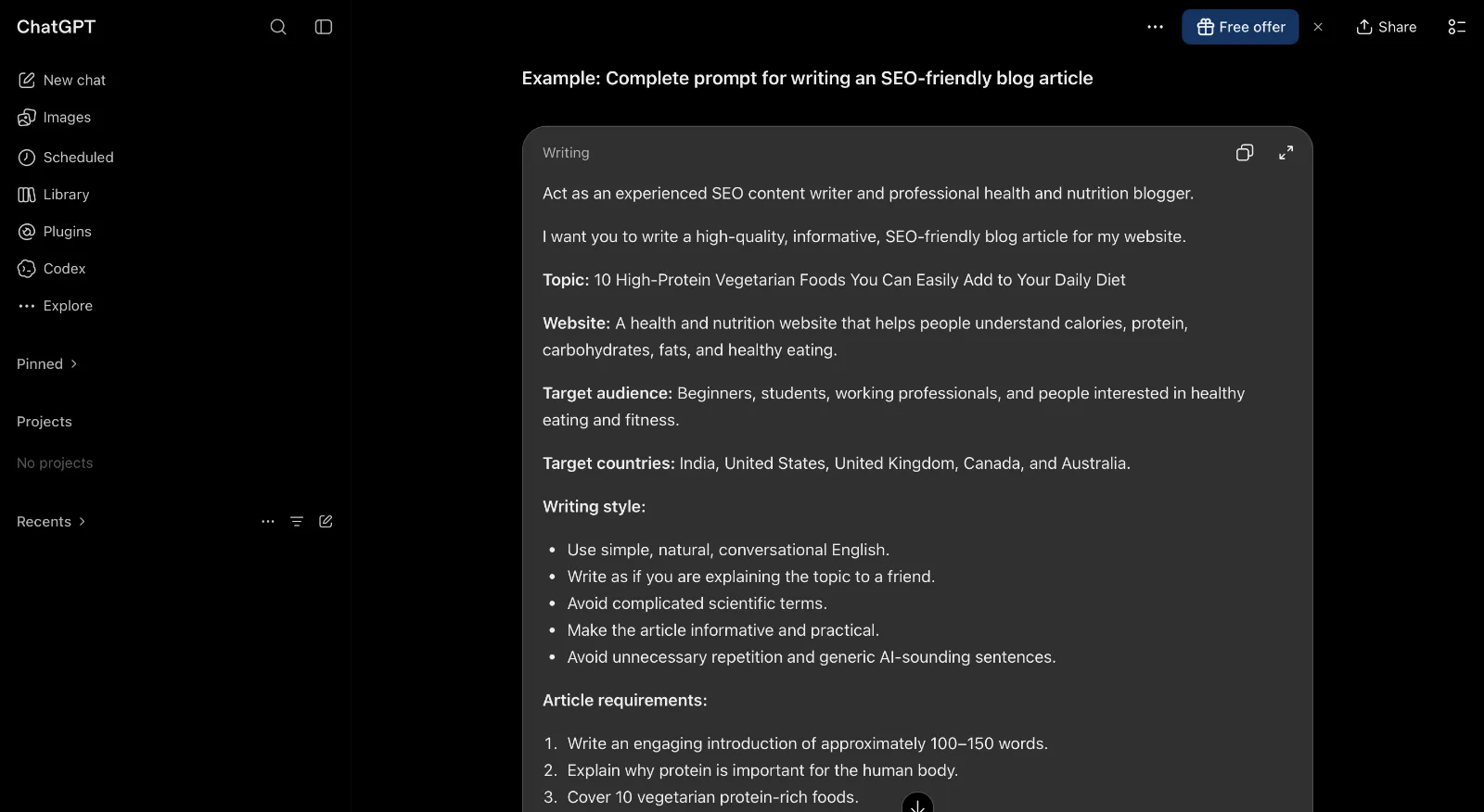
How to Write Better AI Prompts: A Beginner's Guide with Examples
AI tools like ChatGPT, Claude, and Gemini can help you write articles, generate ideas, create images, summarize information, and complete everyday tasks.
But have you ever asked an AI tool a question and received an answer that was completely different from what you expected?
The problem might not be the AI tool. It could be the way you wrote your prompt.
A prompt is simply the instruction or question you give an AI tool. The clearer your instructions, the easier it is for the AI to understand what you want.
In this beginner-friendly guide, you'll learn how to write better AI prompts, discover useful prompt-writing techniques, and explore practical examples you can start using today.
1. What Is an AI Prompt?
An AI prompt is a message, instruction, or question that you enter into an AI tool to get a response.
For example, imagine you enter this prompt:
"Write about fitness."
The AI doesn't know exactly what you need. It could write about exercise, nutrition, gym routines, weight loss, or general health.
Now compare it with this:
"Write a 500-word beginner-friendly article about the benefits of walking every day. Use simple English, include five practical tips, and add a short conclusion."
The second prompt gives the AI much more information.
It explains:
The topic
The target audience
The expected length
The writing style
The structure
This makes it easier to receive an answer that matches your expectations.
2. Use a Clear and Specific Instruction
The first rule of writing better AI prompts is to avoid vague instructions.
Instead of asking:
"Give me some business ideas."
Try:
"Suggest 10 low-cost online business ideas for beginners who have a laptop and internet connection. Focus on ideas that can be started from home without hiring employees."
The improved prompt gives the AI a clear direction.
Remember: You don't need complicated words or technical language. Explain what you want as clearly as you would explain it to another person.
3. Tell the AI Who the Content Is For
The same topic can require completely different answers depending on the audience.
For example, an article about artificial intelligence could be written for:
School students
Business owners
Software developers
Marketing professionals
Complete beginners
Try adding an audience instruction to your prompt.
Example:
"Explain artificial intelligence to someone who has never used an AI tool. Use everyday examples and avoid technical language."
This helps the AI choose an appropriate level of explanation.
4. Give the AI a Role
Another useful technique is to tell the AI what kind of expert or assistant you want it to act as.
For example:
Act as an experienced SEO content writer.
Act as a beginner-friendly coding tutor.
Act as a social media marketing assistant.
Act as a professional email editor.
Act as a YouTube content strategist.
Example prompt:
"Act as an experienced SEO content writer. Create a beginner-friendly blog outline about free AI image generators. Include an introduction, main headings, practical examples, FAQs, and a conclusion."
Giving the AI a role can help establish the perspective and style you expect. However, it does not guarantee that every answer will be accurate or expert-level.
5. Explain the Format You Want
Don't make the AI guess how you want the answer presented.
Tell it whether you need:
A blog article
A step-by-step tutorial
A comparison table
A checklist
A social media caption
An email
A YouTube script
A short summary
Example prompt:
"Compare ChatGPT and Claude in a simple table. Include their main features, strengths, limitations, and suitable use cases. Write for beginners."
If you want a blog article, you can also specify the headings, word count, introduction, FAQs, and conclusion.
6. Include Examples in Your Prompts
Sometimes the easiest way to explain what you want is to show the AI an example.
Suppose you want short social media captions.
You can write:
"Create five Instagram captions for a small coffee shop. Use a friendly, casual tone. Here is an example of the style I like: 'Good coffee, good mood, better mornings!' Create similar captions without copying this exact sentence."
Examples help communicate your preferred style, structure, and level of detail.
You can also paste a paragraph you have written and ask the AI to follow its tone.
7. Add Restrictions and Things to Avoid
Good prompts explain not only what the AI should do, but also what it should avoid.
For example:
"Write a product description for wireless headphones. Use simple English, keep it under 150 words, avoid exaggerated marketing claims, and don't invent product specifications."
Useful restrictions include:
Keep the answer under a certain word count.
Avoid complicated terminology.
Do not use emojis.
Don't repeat the same points.
Use only the information provided.
Mention uncertainty when information cannot be verified.
Don't invent statistics or sources.
These instructions are particularly useful when creating content for websites, businesses, and educational projects.
8. Improve Your Results Through Follow-Up Prompts
You don't always need to get the perfect answer in your first attempt.
One of the biggest advantages of conversational AI tools is that you can continue the conversation and improve the result.
For example:
First prompt:
"Write a blog introduction about the benefits of using AI tools."
Follow-up prompt:
"Make the introduction more engaging and suitable for beginners."
Another follow-up:
"Reduce the length to around 100 words and use a more natural tone."
You can also ask the AI to:
Add more practical examples.
Simplify difficult explanations.
Remove unnecessary information.
Rewrite a section.
Identify missing details.
Check the structure for clarity.
Think of prompt writing as a conversation rather than a one-time command.
9. Copy These 5 Useful AI Prompts
Here are five practical prompts you can copy and use with ChatGPT, Claude, or other conversational AI tools.
Prompt 1: Write a Blog Article
"Act as an experienced blog writer. Write a beginner-friendly article about [TOPIC]. Use simple English, include an engaging introduction, clear headings, practical examples, frequently asked questions, and a useful conclusion. Avoid unnecessary repetition."
Prompt 2: Generate YouTube Video Ideas
"Act as a YouTube content strategist. Suggest 20 video ideas about [NICHE] for a beginner-friendly channel. Focus on topics that solve real audience problems. Give each idea an engaging title and a one-sentence description."
Prompt 3: Improve Your Writing
"Rewrite the following text to make it clearer, more natural, and easier to understand. Keep the original meaning, remove unnecessary words, and avoid making it sound overly formal.
[PASTE YOUR TEXT HERE]"
Prompt 4: Create a Social Media Post
"Create five engaging social media posts about [TOPIC]. Use a friendly and conversational tone. Keep each post short, include a clear message, and add a simple call to action."
Prompt 5: Learn Something New
"Act as a patient teacher. Explain [TOPIC] to a complete beginner. Start with the basics, use everyday examples, explain difficult terms, and finish with five questions to test my understanding."
10. Common AI Prompt Writing Mistakes
Even experienced AI users sometimes make mistakes when writing prompts.
Here are some common problems to avoid.
Being too vague
A prompt like "Make something interesting" doesn't provide enough direction.
Putting too many unrelated tasks into one prompt
Asking an AI to research a topic, write an article, create a marketing campaign, and generate a video script in one instruction can make the response difficult to control.
Break larger projects into smaller steps.
Forgetting the target audience
A technical explanation may not be suitable for someone who is completely new to a topic.
Always mention who will read or use the result.
Assuming AI answers are always correct
AI tools can make mistakes, produce outdated information, or invent details.
Check important facts, statistics, sources, legal information, and technical instructions before using them.
Not reviewing the final result
Even a detailed prompt may not produce exactly what you want.
Read the response, correct errors, and ask follow-up questions when necessary.
11. Which AI Tools Can You Use for Prompt Writing?
You don't need a special prompt-writing application to get started. Several popular AI tools can understand natural-language instructions.
ChatGPT: Useful for writing, brainstorming, explanations, coding assistance, and many everyday tasks.
Claude: Useful for writing, working with longer text, summarizing, and analysis.
Google Gemini: Useful for general AI assistance and tasks that fit its available Google ecosystem integrations.
Each tool has different features, limitations, and subscription options. You can start by experimenting with their free access where available.
The best tool depends on the task you want to complete, not simply on which tool is most popular.
12. Final Thoughts
Writing better AI prompts doesn't have to be difficult.
You don't need to learn programming or memorize complicated commands. Start by explaining what you want, who the answer is for, and how you want the result presented.
A simple structure can make a big difference:
Explain the task.
Mention the target audience.
Describe the format.
Add important details and restrictions.
Review the answer and improve it.
The more clearly you communicate your expectations, the easier it becomes to use AI tools effectively.
Start with a simple prompt today, experiment with different instructions, and learn what works best for your tasks.
Explore more practical AI tutorials and tools on My AI Forge.